 Munshi
To manage cash in and cash out for a small business, use a cash book app: it records every rupee received and paid, keeps a running balance, and should match the cash in your drawer at the end of each day. That single habit makes theft, mistakes and forgotten expenses visible. This guide explains how to choose a cash book app and how to use one well.
What is a cash book?
A cash book is a simple list of money that came in and money that went out, with a balance at the bottom. It is different from a customer khata. The khata answers “who owes whom?” The cash book answers “where did today’s money go, and how much should I have in the drawer?” You need both.
What to look for in a cash book app
- Speed. An entry should take a few taps, or you will skip it at the counter.
- Offline entry. It must work without internet, for power cuts and weak signal.
- Urdu support, including reports.
- Categories you can rename, so you can see what money was for.
- Clear separation from customer credit, so a credit sale is not counted as cash in.
- Reports for any dates, shareable as PDF or Excel.
- Backups, so your money records survive a lost phone.
How to manage cash in and cash out in Munshi
- Open the Cash Book.
- Record cash in each time you receive money: a cash sale, a payment from a customer.
- Record cash out each time you pay: rent, stock, wages, transport. Add a category while recording, or create one first.
- Check the balance. It updates after every entry.
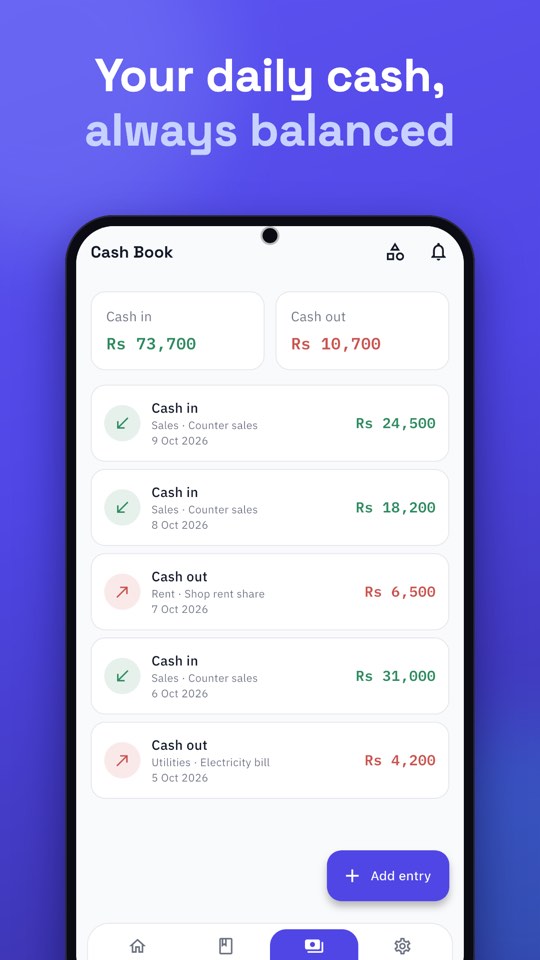
Customer balances live in the khata, while the Cash Book records your day’s cash. Bank money has its own Bank Book, so deposits and withdrawals do not get mixed with drawer cash.
Close your day in five minutes
- Make sure every sale and expense from today is recorded.
- Count the cash in the drawer.
- Compare it with the Cash Book balance.
- If they match, you are done. If not, look for a missing or wrong entry now, while you remember.
Small differences are normal at first. The habit of checking is what shrinks them.
Weekly and monthly review
Once a week, open Reports, choose the dates and look at the Cash Book report. Ask: what was my biggest cash out? Did cash in match what I expected? If you also record expenses by category, the Expense report shows where money goes. Share any report as a PDF or an Excel file. The steps and what is free are in how to create statements and reports in Urdu.
Common mistakes
- Counting a credit sale as cash. If the customer has not paid, it belongs in the khata, not cash in.
- Mixing personal and business cash. Record household withdrawals as their own category, or keep a separate business.
- Recording only at the end of the week. Memory fails. Record as you go.
For more on tracking spending, read how to track business expenses in Pakistan, and for the daily habits that keep every book accurate, see seven small habits of a khata that always balances.