 Munshi
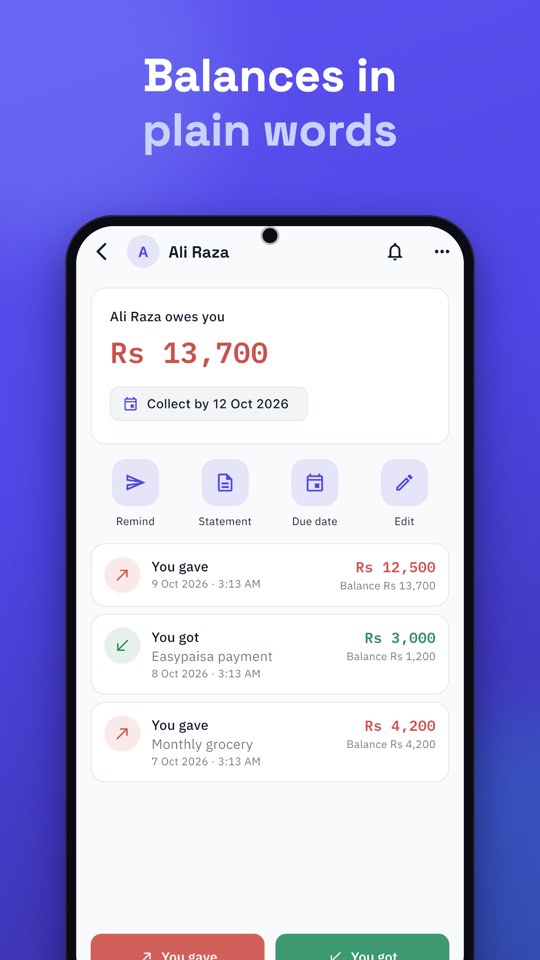
A customer statement is a dated list of everything a customer bought and paid, with a running balance, that you can send as a PDF or Excel file. In Munshi you create one in a few taps, in Urdu or English, for any dates you choose, and share it on WhatsApp. This guide covers the PDF, the Urdu setting and the Excel reports for your whole business.
Why send a khata statement?
A statement ends most “mujhe yaad nahi” conversations without an argument. The customer sees every entry with its date, so there is nothing to dispute. It also makes a reminder stronger: instead of just asking for money, you show how the balance was reached. See our polite WhatsApp reminder messages for wording to send along with it.
How to create a customer statement PDF in Urdu
- Set the language to Urdu. Go to Settings → Language and choose Urdu. The statement is made in the app’s language at the moment you export, and Urdu statements are laid out right to left.
- Open the customer from your Ledger list.
- Tap Statement in the quick actions on their page.
- Choose the dates under Which dates?: this month, last month, this year, all time, or your own range.
- Choose the format: PDF or Excel.
- Share it straight to the customer’s chat on WhatsApp.
Switch the language back to English afterwards if you prefer. The setting only decides the language of the file you export.
PDF or Excel: which should you send?
- PDF is best for customers. It opens on any phone and looks the same everywhere.
- Excel is best for your accountant or for your own sorting and totals.
Business reports for any dates
Statements are per customer. For the whole business, open Reports on Home, pick the dates, and choose a report: Cash Book, Expenses, Profit & Loss or Bank accounts. Each can be shared as a PDF or an Excel file. Bank statements also let you choose the dates before you share.
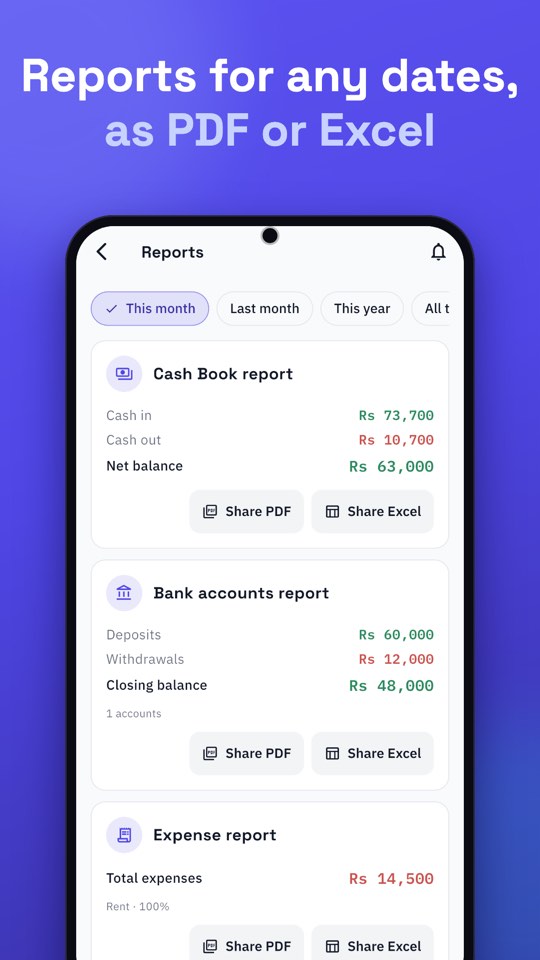
For small business owners in Pakistan this is a handy way to give your accountant or a bank a clear picture without retyping anything. If you track spending too, see how to track business expenses in Pakistan.
What does it cost?
PDFs for this month and last month are free. A PDF that goes further back, and any Excel file, opens after a short ad that you choose to watch; those buttons are marked “Ad”. If no ad can load, for example when you are offline, the file is made anyway. We explain why in why Munshi is free.
When to send a statement
- Monthly, to every customer with a balance. It becomes routine and keeps disputes small.
- With a reminder, when a balance is overdue. Showing how the balance was built is more persuasive than asking for a number.
- When a customer asks “how much do I owe?” Send the statement instead of reading out numbers.
- At year end, for your accountant, using an Excel report for the whole business.
Common questions about statements
Will the Urdu statement look correct on the customer’s phone?
Munshi draws Urdu text carefully so that letters join properly and brackets and amounts read the right way round, even when Urdu words sit beside “Rs 3,500”. The PDF opens the same on every phone, which is why it is the best choice for customers.
Can I send a statement for only part of the year?
Yes. Under Which dates? choose your own range, for example the last three months, and the running balance is shown for those dates.
Does the customer need Munshi to read it?
No. They receive a normal PDF or Excel file on WhatsApp and open it like any other document.
Tips for better statements
- Add a note to entries (“monthly grocery”, “Easypaisa payment”). It shows on the statement and answers questions before they are asked.
- Send statements regularly, not only when a balance is late. A monthly statement keeps disputes small.
- Use the customer’s language. An Urdu statement is easier for many customers to read and trust.